Recently through the WhatsApp Beta app, WhatsApp appeared to be experimenting with a new section where you can restore deleted images on the WhatsApp app. But if that is not enough soon again, it is said that WhatsApp is testing a new component of High Priority Notifications.
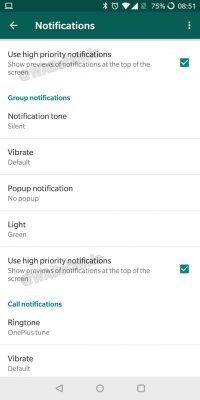
According to the website WABetaInfo The section is located on the WhatsApp Test app where the section will help you to be able to set the top priority of all WhatsApp app information. That is, what happens is that when you turn on this feature, you will be able to find WhatsApp messages at the top of your message tray on your phone and you will be able to see those WhatsApp messages before other apps' messages. According to the information the section is able to work on Android phones with version of Android 5.0 (Android Lollipop) and above, to turn on that feature you will log on to Settings WhatsApp apps then click Notification then select Use High priority notifications.
section of High Priority Notifications
If you have a trial version of WhatsApp Beta for Android system you can turn on that feature right now, make sure you have the app updated before doing so. For Regular WhatsApp users you will have to wait a bit to be able to access this feature on your Android phone. The same is true The admin section to remove other admins without notice is expected to come in the near future.





No comments:
Post a Comment